They weren't tracked. And every missing conversion makes Google's algorithm worse at finding customers like the ones who actually bought.
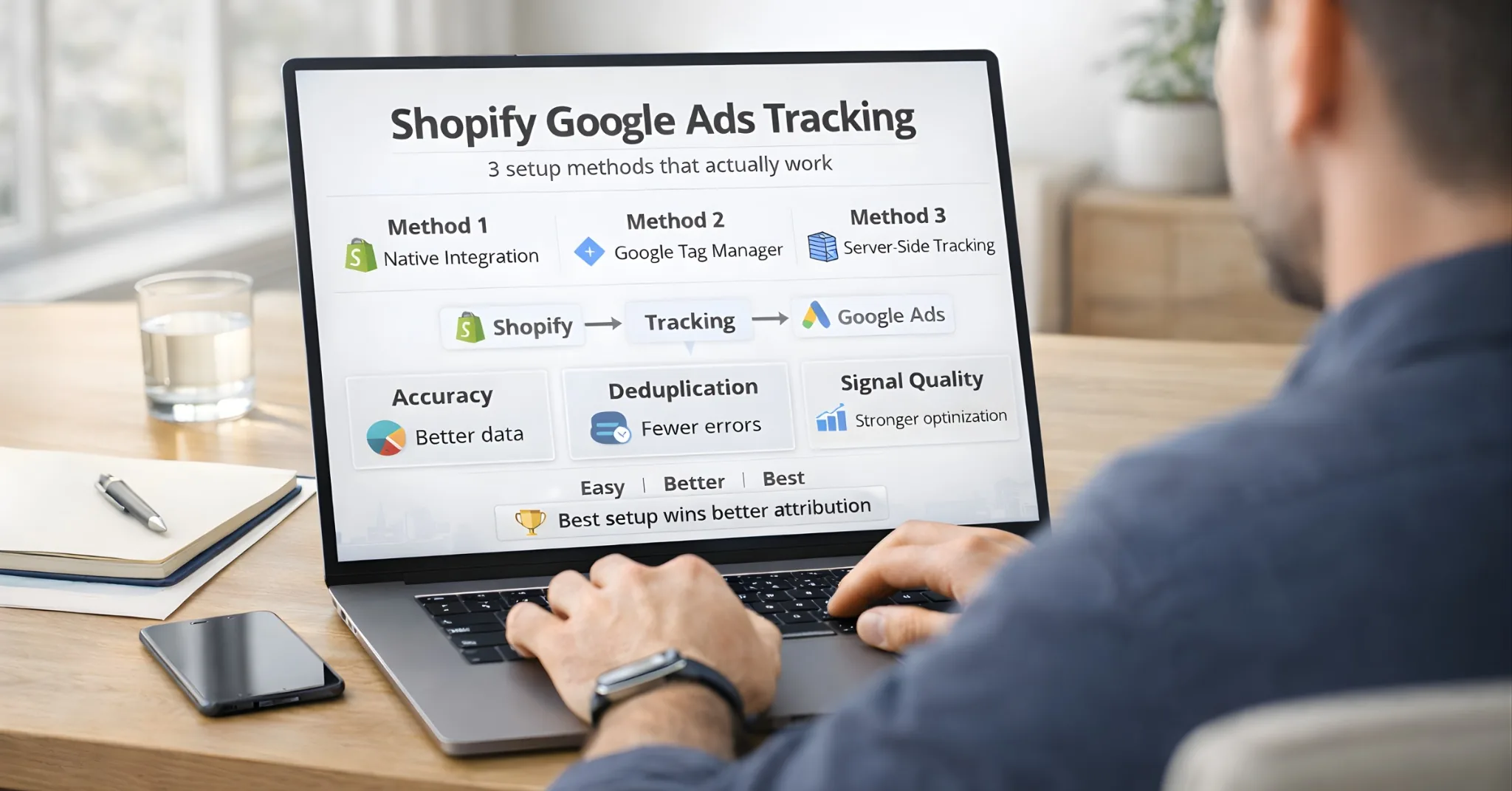
Here's how to fix it — with three setup methods, ranked by accuracy and effort.
Google Ads conversion tracking connects your ad spend to actual sales. Without it, you're guessing which campaigns work. With it, Google's Smart Bidding can optimize toward real purchases instead of clicks that go nowhere.
In 2026, accurate tracking is harder than ever. Ad blockers, iOS privacy changes, and cookie restrictions mean the old "paste a pixel and forget it" approach loses 20-40% of conversions. This guide covers three setup methods — from simplest to most accurate — so you can choose what fits your business.
Why Conversion Tracking Matters
Before setup, understand what you're solving:
Without Tracking
With Tracking
Google optimizes for clicks
Google optimizes for purchases
You guess which ads work
You see which ads drive revenue
Smart Bidding has no data
Smart Bidding improves over time
ROAS is a mystery
ROAS is measurable
The business impact: Stores with accurate conversion tracking typically see 15-30% better ROAS because Google's algorithm can learn what a converting customer looks like. For a related guide on shopify SEO attribution gap — covering how organic Google traffic gets misattributed alongside paid — see that breakdown.
The 3 Setup Methods (Compared)
GOOGLE ADS SHOPIFY TRACKING:CHOOSE YOUR METHOD═══════════════════════════════════════════════════════════════════════EASE OF TRACKING BEST FORSETUP ACCURACY────────────────────────────────────────────────────────────────────────
METHOD 1:★★★★★ ~70-80% Beginners,Google & YouTube(5 min)small storesApp
METHOD 2:★★★☆☆ ~75-85% Stores needingManual Setup(30-60 min)custom config(GTM orCheckout)METHOD 3:★★☆☆☆ ~95%+ Scaling stores,Server-Side(2-4 hours)high ad spendTracking────────────────────────────────────────────────────────────────────────
GOOGLE ADS SHOPIFY TRACKING:CHOOSE YOUR METHOD═══════════════════════════════════════════════════════════════════════EASE OF TRACKING BEST FORSETUP ACCURACY────────────────────────────────────────────────────────────────────────
METHOD 1:★★★★★ ~70-80% Beginners,Google & YouTube(5 min)small storesApp
METHOD 2:★★★☆☆ ~75-85% Stores needingManual Setup(30-60 min)custom config(GTM orCheckout)METHOD 3:★★☆☆☆ ~95%+ Scaling stores,Server-Side(2-4 hours)high ad spendTracking────────────────────────────────────────────────────────────────────────
GOOGLE ADS SHOPIFY TRACKING:CHOOSE YOUR METHOD═══════════════════════════════════════════════════════════════════════EASE OF TRACKING BEST FORSETUP ACCURACY────────────────────────────────────────────────────────────────────────
METHOD 1:★★★★★ ~70-80% Beginners,Google & YouTube(5 min)small storesApp
METHOD 2:★★★☆☆ ~75-85% Stores needingManual Setup(30-60 min)custom config(GTM orCheckout)METHOD 3:★★☆☆☆ ~95%+ Scaling stores,Server-Side(2-4 hours)high ad spendTracking────────────────────────────────────────────────────────────────────────
How Data Flows in Each Method
DATA PATH ARCHITECTURE:WHERE YOUR CONVERSION DATA TRAVELS═══════════════════════════════════════════════════════════════════════
METHOD 1:GOOGLE & YOUTUBE APP┌──────────┐ ┌──────────┐ ┌──────────┐│ SHOPIFY │───►│ BROWSER │───►│ GOOGLE ││ CHECKOUT │ │(Pixel)│ │ ADS │└──────────┘ └──────────┘ └──────────┘│▼❌ AD BLOCKERS❌ SAFARI ITP❌ iOS PRIVACY
METHOD 2:MANUAL(Shopify Pixels / GTM)┌──────────┐ ┌──────────┐ ┌──────────┐│ SHOPIFY │───►│ BROWSER │───►│ GOOGLE ││ CHECKOUT │ │(Custom │ │ ADS │└──────────┘ │ Pixel)│ └──────────┘└──────────┘│▼❌ AD BLOCKERS❌ SAFARI ITP(More control,same vulnerability)
METHOD 3:SERVER-SIDE┌──────────┐ ┌──────────┐ ┌──────────┐ ┌──────────┐│ SHOPIFY │───►│ BROWSER │───►│ YOUR │───►│ GOOGLE ││ CHECKOUT │ │(Event)│ │ SERVER │ │ ADS API │└──────────┘ └──────────┘ └──────────┘ └──────────┘│▼✓ BYPASSES BLOCKERS✓ FIRST-PARTY COOKIES✓ DATA ENRICHMENT
DATA PATH ARCHITECTURE:WHERE YOUR CONVERSION DATA TRAVELS═══════════════════════════════════════════════════════════════════════
METHOD 1:GOOGLE & YOUTUBE APP┌──────────┐ ┌──────────┐ ┌──────────┐│ SHOPIFY │───►│ BROWSER │───►│ GOOGLE ││ CHECKOUT │ │(Pixel)│ │ ADS │└──────────┘ └──────────┘ └──────────┘│▼❌ AD BLOCKERS❌ SAFARI ITP❌ iOS PRIVACY
METHOD 2:MANUAL(Shopify Pixels / GTM)┌──────────┐ ┌──────────┐ ┌──────────┐│ SHOPIFY │───►│ BROWSER │───►│ GOOGLE ││ CHECKOUT │ │(Custom │ │ ADS │└──────────┘ │ Pixel)│ └──────────┘└──────────┘│▼❌ AD BLOCKERS❌ SAFARI ITP(More control,same vulnerability)
METHOD 3:SERVER-SIDE┌──────────┐ ┌──────────┐ ┌──────────┐ ┌──────────┐│ SHOPIFY │───►│ BROWSER │───►│ YOUR │───►│ GOOGLE ││ CHECKOUT │ │(Event)│ │ SERVER │ │ ADS API │└──────────┘ └──────────┘ └──────────┘ └──────────┘│▼✓ BYPASSES BLOCKERS✓ FIRST-PARTY COOKIES✓ DATA ENRICHMENT
DATA PATH ARCHITECTURE:WHERE YOUR CONVERSION DATA TRAVELS═══════════════════════════════════════════════════════════════════════
METHOD 1:GOOGLE & YOUTUBE APP┌──────────┐ ┌──────────┐ ┌──────────┐│ SHOPIFY │───►│ BROWSER │───►│ GOOGLE ││ CHECKOUT │ │(Pixel)│ │ ADS │└──────────┘ └──────────┘ └──────────┘│▼❌ AD BLOCKERS❌ SAFARI ITP❌ iOS PRIVACY
METHOD 2:MANUAL(Shopify Pixels / GTM)┌──────────┐ ┌──────────┐ ┌──────────┐│ SHOPIFY │───►│ BROWSER │───►│ GOOGLE ││ CHECKOUT │ │(Custom │ │ ADS │└──────────┘ │ Pixel)│ └──────────┘└──────────┘│▼❌ AD BLOCKERS❌ SAFARI ITP(More control,same vulnerability)
METHOD 3:SERVER-SIDE┌──────────┐ ┌──────────┐ ┌──────────┐ ┌──────────┐│ SHOPIFY │───►│ BROWSER │───►│ YOUR │───►│ GOOGLE ││ CHECKOUT │ │(Event)│ │ SERVER │ │ ADS API │└──────────┘ └──────────┘ └──────────┘ └──────────┘│▼✓ BYPASSES BLOCKERS✓ FIRST-PARTY COOKIES✓ DATA ENRICHMENT
Method 1: Google & YouTube App (Fastest)
Best for: New stores, beginners, stores spending under $5K/month on Google Ads
Time: 5-10 minutes
Accuracy: ~70-80% of conversions tracked
This is Shopify's official integration. It automatically installs Google tags and creates conversion actions in your Google Ads account.
Setup Steps
Step 1: Install the App
Go to Shopify App Store
Search "Google & YouTube"
Click Install
Step 2: Connect Your Accounts
Sign in with your Google account
Connect your Google Ads account
Connect Google Merchant Center (if using Shopping ads)
Step 3: Enable Conversion Tracking
In the app, go to Settings
Find "Conversion tracking" and confirm it's enabled
The app automatically tracks: Page views, Add to cart, Begin checkout, Purchase
Step 4: Enable Enhanced Conversions
In Settings, find "Google Ads settings"
Click "Turn on" next to Enhanced Conversions
Accept the customer data terms
What Gets Tracked Automatically
Event
Tracked?
Purchase
✅ Yes (with value)
Begin Checkout
✅ Yes
Add to Cart
✅ Yes
View Product
✅ Yes
Custom Events
❌ No
Limitations
Only connects ONE Google Ads account (problematic for agencies or MCCs)
Limited customization options
Can't track custom events or micro-conversions
No server-side tracking (vulnerable to ad blockers)
Method 2: Manual Setup (More Control)
Best for: Stores needing custom configuration, multiple ad accounts, or specific attribution settings
Time: 30-60 minutes
Accuracy: ~75-85% of conversions tracked
Manual setup gives you more control over what's tracked and how values are calculated. In 2026, Shopify offers three manual approaches:
Approach
Status
Best For
Shopify Customer Events (Pixels)
✅ Recommended (2026)
Modern stores on Checkout Extensibility
Google Tag Manager
✅ Supported
Complex setups, multiple platforms
Additional Scripts (Legacy)
⚠️ Deprecated
Older stores not yet migrated
⚠️ 2026 Update: Shopify Checkout Extensibility
Most Shopify stores have migrated to Checkout Extensibility, which replaces the old "Additional Scripts" method. If your store uses Checkout Extensibility, use Shopify Customer Events (Pixels) instead of editing theme.liquid or checkout scripts.
This is Shopify's modern approach using the Customer Events API. Pixels run in a secure sandbox and are the recommended method for stores on Checkout Extensibility.
Step 1: Create Your Conversion Action in Google Ads
In Google Ads, go to Goals → Conversions → Summary
Click "+ New conversion action" → Website
Choose "Add a conversion action manually"
Configure: Name "Purchase", Category "Purchase", Value "Use different values"
Enhanced Conversions send hashed customer data (email, phone, address) to improve match rates. In 2026, this is essential for accurate cross-device attribution.
Why Enhanced Conversions Matter:
THE CROSS-DEVICE PROBLEM:HOW ENHANCED CONVERSIONS BRIDGE THE GAP═══════════════════════════════════════════════════════════════════════WITHOUT ENHANCED CONVERSIONS:┌──────────────┐ ┌──────────────┐│ MONDAY │ │ FRIDAY ││ Phone │ ❓ NO LINK ❓ │ Laptop ││ │ │ ││ Clicks ad │ ─ ─ ─ ─ ─ ─ ─ ─ ─ ─ ─ ─ ─ ─►│ Purchases ││(GCLID A)│ │(GCLID ?)││ │ │ ││ Cookie set │ Cookie expired or │ Different ││ │ different device │ browser │└──────────────┘ └──────────────┘
RESULT:Google Ads sees purchase but can't attribute to original click
→ Conversion showsas"unattributed"or credited to wrong campaignWITH ENHANCED CONVERSIONS:┌──────────────┐ ┌──────────────┐│ MONDAY │ │ FRIDAY ││ Phone │ │ Laptop ││ │ │ ││ Clicks ad │ │ Purchases ││(GCLID A)│ │ Email:X ││ │ │ ││ User signed │ ✅ MATCHED │ Email hash ││ into Google │◄─ ─ ─ ─ ─ ─ ─ ─ ─ ─ ─ ─ ─ ─►│ sent to ││(Email: X)│ │ Google │└──────────────┘ └──────────────┘
RESULT:Google matches hashed email to signed-inuser at click time→ Conversion correctly attributed to Monday's ad click
THE CROSS-DEVICE PROBLEM:HOW ENHANCED CONVERSIONS BRIDGE THE GAP═══════════════════════════════════════════════════════════════════════WITHOUT ENHANCED CONVERSIONS:┌──────────────┐ ┌──────────────┐│ MONDAY │ │ FRIDAY ││ Phone │ ❓ NO LINK ❓ │ Laptop ││ │ │ ││ Clicks ad │ ─ ─ ─ ─ ─ ─ ─ ─ ─ ─ ─ ─ ─ ─►│ Purchases ││(GCLID A)│ │(GCLID ?)││ │ │ ││ Cookie set │ Cookie expired or │ Different ││ │ different device │ browser │└──────────────┘ └──────────────┘
RESULT:Google Ads sees purchase but can't attribute to original click
→ Conversion showsas"unattributed"or credited to wrong campaignWITH ENHANCED CONVERSIONS:┌──────────────┐ ┌──────────────┐│ MONDAY │ │ FRIDAY ││ Phone │ │ Laptop ││ │ │ ││ Clicks ad │ │ Purchases ││(GCLID A)│ │ Email:X ││ │ │ ││ User signed │ ✅ MATCHED │ Email hash ││ into Google │◄─ ─ ─ ─ ─ ─ ─ ─ ─ ─ ─ ─ ─ ─►│ sent to ││(Email: X)│ │ Google │└──────────────┘ └──────────────┘
RESULT:Google matches hashed email to signed-inuser at click time→ Conversion correctly attributed to Monday's ad click
THE CROSS-DEVICE PROBLEM:HOW ENHANCED CONVERSIONS BRIDGE THE GAP═══════════════════════════════════════════════════════════════════════WITHOUT ENHANCED CONVERSIONS:┌──────────────┐ ┌──────────────┐│ MONDAY │ │ FRIDAY ││ Phone │ ❓ NO LINK ❓ │ Laptop ││ │ │ ││ Clicks ad │ ─ ─ ─ ─ ─ ─ ─ ─ ─ ─ ─ ─ ─ ─►│ Purchases ││(GCLID A)│ │(GCLID ?)││ │ │ ││ Cookie set │ Cookie expired or │ Different ││ │ different device │ browser │└──────────────┘ └──────────────┘
RESULT:Google Ads sees purchase but can't attribute to original click
→ Conversion showsas"unattributed"or credited to wrong campaignWITH ENHANCED CONVERSIONS:┌──────────────┐ ┌──────────────┐│ MONDAY │ │ FRIDAY ││ Phone │ │ Laptop ││ │ │ ││ Clicks ad │ │ Purchases ││(GCLID A)│ │ Email:X ││ │ │ ││ User signed │ ✅ MATCHED │ Email hash ││ into Google │◄─ ─ ─ ─ ─ ─ ─ ─ ─ ─ ─ ─ ─ ─►│ sent to ││(Email: X)│ │ Google │└──────────────┘ └──────────────┘
RESULT:Google matches hashed email to signed-inuser at click time→ Conversion correctly attributed to Monday's ad click
Setup Steps:
In Google Ads, go to your conversion action
Click "Enhanced conversions" → Turn on
Select implementation method (Google Tag or GTM)
If using GTM, configure the enhanced conversions tag to pull from your data layer
Data sent (all hashed with SHA256):
Email address
Phone number
First and last name
Street address, city, state, postal code, country
Method 3: Server-Side Tracking (Most Accurate)
Best for: Stores spending $10K+/month on ads, high traffic stores, brands prioritizing data accuracy
Time: 2-4 hours (or use a managed solution)
Accuracy: ~95%+ of conversions tracked
Server-side tracking routes conversion data through your server before sending to Google. This bypasses ad blockers, extends cookie life, and enables data enrichment.
Why Server-Side Wins
CLIENT-SIDE vs. SERVER-SIDE ACCURACY═══════════════════════════════════════════════════════════════════════CLIENT-SIDE(Methods 1 & 2):┌─────────────────────────────────────────────────────────────────────┐│ Browser → Google Ads ││ ││ ❌ Blocked by ad blockers(30%+ of users)││ ❌ Blocked by Safari ITP(7-day cookiecap)││ ❌ Affected by iOS privacy settings ││ ❌ Lost when JavaScript fails ││ ││ RESULT:60-80% of conversions tracked │└─────────────────────────────────────────────────────────────────────┘SERVER-SIDE(Method 3):┌─────────────────────────────────────────────────────────────────────┐│ Browser → Your Server → Google Ads ││ ││ ✓ First-party domain(bypasses blockers)││ ✓ Server-set cookies(400+ day lifespan)││ ✓ Not affected by browser restrictions ││ ✓ Can enrich data withbackend info ││ ││ RESULT:95%+ of conversions tracked │└─────────────────────────────────────────────────────────────────────┘
CLIENT-SIDE vs. SERVER-SIDE ACCURACY═══════════════════════════════════════════════════════════════════════CLIENT-SIDE(Methods 1 & 2):┌─────────────────────────────────────────────────────────────────────┐│ Browser → Google Ads ││ ││ ❌ Blocked by ad blockers(30%+ of users)││ ❌ Blocked by Safari ITP(7-day cookiecap)││ ❌ Affected by iOS privacy settings ││ ❌ Lost when JavaScript fails ││ ││ RESULT:60-80% of conversions tracked │└─────────────────────────────────────────────────────────────────────┘SERVER-SIDE(Method 3):┌─────────────────────────────────────────────────────────────────────┐│ Browser → Your Server → Google Ads ││ ││ ✓ First-party domain(bypasses blockers)││ ✓ Server-set cookies(400+ day lifespan)││ ✓ Not affected by browser restrictions ││ ✓ Can enrich data withbackend info ││ ││ RESULT:95%+ of conversions tracked │└─────────────────────────────────────────────────────────────────────┘
CLIENT-SIDE vs. SERVER-SIDE ACCURACY═══════════════════════════════════════════════════════════════════════CLIENT-SIDE(Methods 1 & 2):┌─────────────────────────────────────────────────────────────────────┐│ Browser → Google Ads ││ ││ ❌ Blocked by ad blockers(30%+ of users)││ ❌ Blocked by Safari ITP(7-day cookiecap)││ ❌ Affected by iOS privacy settings ││ ❌ Lost when JavaScript fails ││ ││ RESULT:60-80% of conversions tracked │└─────────────────────────────────────────────────────────────────────┘SERVER-SIDE(Method 3):┌─────────────────────────────────────────────────────────────────────┐│ Browser → Your Server → Google Ads ││ ││ ✓ First-party domain(bypasses blockers)││ ✓ Server-set cookies(400+ day lifespan)││ ✓ Not affected by browser restrictions ││ ✓ Can enrich data withbackend info ││ ││ RESULT:95%+ of conversions tracked │└─────────────────────────────────────────────────────────────────────┘
Server-Side Setup Options
Option A: Self-Hosted sGTM
Set up Server-Side Google Tag Manager on Google Cloud
Configure a custom subdomain (e.g., track.yourstore.com)
Install Google Ads conversion tag in server container
Enable Enhanced Conversions at server level
Option B: Managed Solutions Platforms like Stape, Elevar, or Littledata handle the infrastructure:
Install the app from Shopify App Store
Connect your Google Ads account
Configure conversion events
The platform manages server containers and API connections. For the turnkey Google Ads integration that handles sGTM, Enhanced Conversions, and Consent Mode v2 in one connected setup, see the integrations page.
What Server-Side Enables
Feature
Client-Side
Server-Side
Bypasses ad blockers
❌
✅
Extended cookie life
7 days (Safari)
400+ days
Enhanced Conversions
✅
✅ (more reliable)
Consent Mode v2
Limited
Full support
Data enrichment
❌
✅
GCLID persistence
Fragile
Robust
Common Setup Mistakes
Mistake 1: Duplicate Conversions
Problem: Conversion fires multiple times for one purchase Fix: Use {% if first_time_accessed %} wrapper in Shopify checkout scripts
Mistake 2: Wrong Conversion Value
Problem: Values show in cents instead of dollars (or vice versa) Fix: Use {{ total_price | divided_by: 100.0 }} for correct decimal formatting
Mistake 3: Missing Transaction ID
Problem: Google can't deduplicate, leading to inflated numbers Fix: Always include 'transaction_id': '{{ order.order_number }}'
Mistake 4: Multiple Tracking Methods Conflicting
Problem: Google & YouTube app AND manual tags both firing Fix: Choose one method. If using manual, disable app tracking. If using app, remove manual code.
Mistake 5: Not Enabling Enhanced Conversions
Problem: Lower match rates, less data for Smart Bidding Fix: Enable Enhanced Conversions in whichever method you use
Mistake 6: Missing Google Consent Mode (EEA/UK Traffic)
Problem: Google Ads shows "Inactive" or "No recent conversions" even though tags are firing Fix: Implement Google Consent Mode v2
🚨 2026 Requirement: Google Consent Mode
Google Ads now requires Consent Mode for traffic from the EEA and UK, and is increasingly applying it globally. Without proper Consent Mode setup:
Conversions may show as "Inactive" in Google Ads
Smart Bidding performance degrades significantly
You may lose access to certain Google Ads features
Quick fix: If using the Google & YouTube app, Consent Mode is handled automatically when you connect a certified CMP (Consent Management Platform). For manual setups, implement the gtag('consent', 'default', {...}) command before your conversion tags.
Verifying Your Setup
After setup, verify tracking is working:
In Google Ads
Go to Goals → Conversions → Summary
Check "Status" column — should show "Recording conversions"
Method 3 (every conversion matters). If you're also running Meta ads, see Shopify Meta tracking setup — the Meta CAPI implementation has parallel decision logic but different platform-specific configuration.
The Bottom Line
Google Ads conversion tracking connects your ad spend to real revenue. Without it, you're optimizing blind.
Key takeaways:
Method 1 (App) — Fastest setup, good for beginners, ~70-80% accuracy
Method 2 (Manual) — More control, custom configuration, ~75-85% accuracy
Method 3 (Server-Side) — Maximum accuracy (~95%+), bypasses blockers, best for scaling
Always enable Enhanced Conversions — Improves match rates by sending hashed customer data
Verify your setup — Use Tag Assistant and check Google Ads conversion status
Avoid duplicates — Use first_time_accessed wrapper and choose ONE tracking method
For stores serious about scaling Google Ads, server-side tracking is the 2026 standard. It recovers the 20-40% of conversions lost to ad blockers and privacy restrictions — conversions that directly improve Smart Bidding performance.
Get Started
Start Tracking Every Sale Today
Join 1,389+ e-commerce stores. Set up in 5 minutes, see results in days.