Your Meta pixel fires. The event disappears into the void. The customer completes their purchase, but Facebook never knows it happened. Your "conversion" becomes invisible — and your ad algorithm learns nothing from a sale you actually made.
This isn't a rare edge case. It's the daily reality of browser-based tracking in 2026.
Client-side tracking — the JavaScript pixels that have powered digital advertising for over a decade — now fails to capture 40-60% of conversions for many e-commerce brands. iOS privacy restrictions, ad blockers, browser cookie limits, and cross-device journeys have created gaps that traditional tracking can't bridge.
Server-side tracking bypasses these limitations entirely. But the transition isn't just a technical upgrade — it's a fundamental shift in how your marketing data flows.
This guide explains what's actually different between the two approaches, quantifies the business impact of each, and provides a framework for deciding when (and how) to make the switch.
How Client-Side Tracking Works (And Where It Breaks)
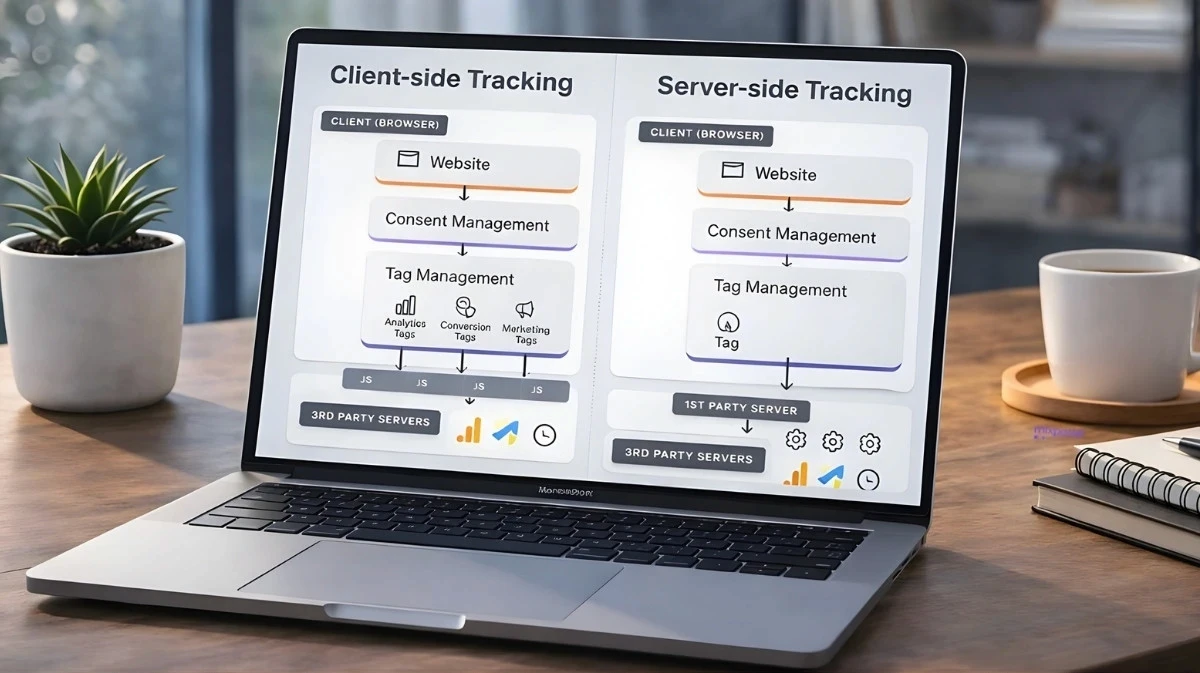
Client-side tracking runs JavaScript code in your visitor's browser. When someone lands on your site, the browser loads tracking scripts (Meta Pixel, Google Ads tag, TikTok Pixel) that monitor user behavior and send events back to ad platforms.
The data flow:
User visits your site
Browser loads tracking pixel
Pixel monitors actions (page views, add-to-cart, purchase)
Browser sends event data to ad platform
This approach worked well when browsers freely accepted third-party cookies and users had no way to block tracking. That world no longer exists.
Where Client-Side Tracking Fails
iOS App Tracking Transparency (ATT) When Apple introduced ATT, roughly 65-75% of iOS users opted out of cross-app tracking. For these users, the Meta Pixel can't connect ad clicks to website conversions. The purchase happens — the pixel just can't see it.
Browser Privacy Features Safari's Intelligent Tracking Prevention (ITP) limits first-party cookies to 7 days (or 24 hours in some cases). Firefox's Enhanced Tracking Protection blocks many tracking scripts entirely. Even Chrome now prompts users to choose their tracking preferences through Global User Choice.
Ad Blockers An estimated 30-40% of users run ad blockers that prevent tracking pixels from loading at all. The pixel never fires because the browser never executes the code.
Cross-Device Journeys A customer clicks your ad on mobile, then purchases on desktop. Unless they're logged into the same account on both devices, client-side tracking sees two anonymous users — not one customer journey. The conversion may be attributed to "direct traffic" or missed entirely.
Page Load Issues If a user clicks away before your pixel fully loads, or if the tracking script errors out, the event is lost. Slow pages, JavaScript conflicts, and network issues all cause silent tracking failures.
Quantifying the Data Loss
The cumulative impact is significant:
Data Loss Source | Estimated Impact |
|---|---|
iOS ATT opt-outs | 20-35% of mobile conversions |
Ad blockers | 10-15% of all conversions |
Browser cookie limits | 10-20% of delayed conversions |
Cross-device journeys | 15-25% of multi-session purchases |
Page load / script failures | 5-10% of all events |
These percentages overlap (a single conversion can be blocked by multiple factors), but the net effect for most e-commerce brands is 40-60% of conversions going unreported through client-side tracking alone.
That's not a reporting inconvenience — it's a fundamental breakdown in your ability to measure and optimize advertising.
How Server-Side Tracking Works
Server-side tracking moves data collection from the browser to your server. Instead of relying on JavaScript that runs in the user's browser, your server captures conversion events and sends them directly to ad platforms via their APIs. For a deeper walkthrough of how server-side tracking works in practice, including the event payload structure and identity-resolution flow, that guide goes one layer deeper.
The data flow:
User completes an action (purchase, signup)
Your e-commerce platform records the transaction
Your server sends event data to ad platform APIs (Meta CAPI, Google Enhanced Conversions)
Ad platform receives conversion data directly
Because the data transfer happens server-to-server, it bypasses every client-side limitation:
iOS opt-outs don't block it — data flows from your server, not the user's device
Ad blockers can't stop it — no browser script to block
Cookie limits don't apply — server-side cookies can persist much longer
Cross-device journeys are connected — your backend knows the customer regardless of device
First-Party Data Sovereignty
One of the most significant but often overlooked benefits of server-side tracking is the ability to set cookies in a first-party context.
With client-side tracking, cookies are set by external domains like facebook.net or google-analytics.com. Browsers increasingly classify these as third-party cookies and restrict them — Safari limits them to 24 hours, and many browsers block them entirely.
Server-side tracking routes data through your own subdomain (e.g., track.yourdomain.com). This means:
Cookies are set by your domain, not an external tracker
Browsers treat them as first-party, extending lifespan from 24 hours to 7+ days
You maintain full control over what data is collected and shared
Attribution windows expand because user identification persists longer
This "first-party context" is why server-side tracking recovers so much lost data — it's not just bypassing ad blockers, it's fundamentally changing how browsers classify your tracking infrastructure. To see how the tracking process works end-to-end — from first-party subdomain routing through CAPI delivery and EMQ scoring — that walkthrough shows the full event flow.
What Server-Side Tracking Requires
The tradeoff: server-side tracking isn't as simple as copying a pixel code snippet. It requires:
API Integration You need connections to each ad platform's server-side API — Meta's Conversions API (CAPI), Google's Enhanced Conversions, TikTok's Events API. These require authentication, proper data formatting, and ongoing maintenance as APIs evolve.
Data Infrastructure Your e-commerce platform or backend must capture conversion events with enough detail to send meaningful data — customer identifiers, transaction values, product information.
Identity Resolution To match server-side conversions back to ad clicks, you need to capture and send identifying parameters: email addresses (hashed), phone numbers (hashed), click IDs (fbclid, gclid), and browser cookies where available.
For Shopify stores, native integrations and third-party tools have simplified this significantly. For custom platforms, implementation requires more technical work — but the data quality improvement justifies the investment. If you're evaluating outsourcing this work, see a related guide on server side tracking agencies guide covering scope, pricing, and what to expect from a partner.
The Performance Impact: Why Server-Side Matters for Algorithms
The conversion data gap isn't just a reporting problem — it directly degrades your ad performance.
How Ad Algorithms Learn
Meta's Advantage+ campaigns, Google's Performance Max, and TikTok's Smart Campaigns all use machine learning to optimize targeting and bidding. These algorithms learn from conversion data: which audiences convert, which creatives perform, which placements deliver results.
When 40-60% of conversions are invisible, algorithms learn from incomplete information. They see audiences that "don't convert" (when actually, conversions just weren't tracked) and optimize away from them. They can't identify patterns in your best customers because they don't know those customers exist.
The result: worse targeting, higher CPAs, and lower ROAS — not because your ads are bad, but because the algorithm is flying blind.
Event Match Quality (EMQ)
For server-side tracking to work effectively, ad platforms need to match your conversion data back to specific ad interactions. Meta measures this with Event Match Quality (EMQ).
EMQ Score | Matching Accuracy | Algorithm Impact |
|---|---|---|
Below 4.0 | Poor | Severely limited optimization |
4.0-6.0 | Moderate | Suboptimal learning |
6.0-8.0 | Good | Effective optimization |
Above 8.0 | Excellent | Maximum algorithm performance |
To achieve high EMQ, send multiple identifiers with each event:
Hashed email address
Hashed phone number
fbp cookie (Meta's first-party identifier)
fbc parameter (click ID from the ad URL)
Client IP address and user agent
More identifiers = higher match rates = better algorithm optimization.
Data Freshness
How quickly you send conversion data also matters. Meta's Advantage+ and Google's automated bidding make real-time decisions based on incoming signals.
Data Delay | Optimization Impact |
|---|---|
< 1 hour | Optimal — real-time algorithm adjustment |
1-4 hours | Acceptable — minor lag |
4-12 hours | Degraded — stale data affects decisions |
> 12 hours | Severely impaired — missed optimization windows |
If you're batch-processing server-side events once daily, you're handicapping the algorithms you're paying to optimize your campaigns.
The Hybrid Approach: Why You Need Both
Server-side tracking doesn't mean abandoning client-side entirely. The most effective setup uses both — a hybrid approach that maximizes data capture while maintaining compatibility.
How Hybrid Tracking Works
Client-side pixel fires when an event occurs (if not blocked)
Server-side API sends the same event with matching event ID
Ad platform deduplicates — counts it once, uses the richer data
This approach ensures:
If the pixel fires, you get rich browser-side data (viewport, referrer, session info)
If the pixel is blocked, the server-side event still arrives
No double-counting because event IDs match
When Client-Side Still Matters
Some use cases genuinely require browser-based tracking:
A/B testing tools (Optimizely, VWO) need real-time browser feedback
Heatmaps and session recording (Hotjar, FullStory) require DOM access
Real-time personalization depends on immediate browser signals
For conversion tracking and ad optimization, server-side is essential. For UX research and on-site testing, client-side remains necessary.
Decision Framework: Should You Switch?
Use this framework to assess whether server-side tracking is worth the investment for your business. For the full financial breakdown — including payback period and revenue lift modeling — see a related guide on server side tracking ROI.
You Need Server-Side Tracking If:
Your Attribution Accuracy is below 80% If platform-reported conversions are significantly lower than actual orders from paid traffic, you're losing data that server-side tracking would capture.
You run significant Meta or TikTok spend These platforms are most affected by iOS ATT. If mobile social is a major channel, server-side tracking is essential.
Your EMQ score is below 6.0 Low EMQ means Meta can't match conversions to ad interactions. Server-side tracking with proper identifiers fixes this.
You're scaling and need algorithm efficiency At higher spend levels, the difference between a well-trained and poorly-trained algorithm compounds. Better data = better optimization = lower CAC.
You sell high-consideration products Longer sales cycles mean more cross-device journeys and delayed conversions — exactly what client-side tracking misses.
You Can Delay If:
You're just starting with paid ads Client-side tracking is fine for initial testing and learning. Invest in server-side once you're scaling.
Your traffic is primarily desktop Desktop browsers have fewer restrictions than mobile. If 80%+ of your conversions happen on desktop, the urgency is lower.
You're spending less than $5K/month At lower spend levels, tracking improvements have less absolute impact. Focus on product-market fit first.
Implementation Checklist
If you're ready to implement server-side tracking, use this checklist:
Platform Connections
Meta Conversions API (CAPI) configured and verified
Google Enhanced Conversions enabled
TikTok Events API connected (if applicable)
Other platforms as needed (Pinterest, Snapchat, LinkedIn)
Data Quality
Event Match Quality score above 6.0 for all major events
Hashed email and phone included with Purchase events
Click IDs (fbclid, gclid) captured and forwarded
First-party cookies (fbp, fbc) passed to server-side events
Consent Management
Google Consent Mode v2 implemented and verified
Global Privacy Control (GPC) signals honored
Consent string passed with server-side events
Region-specific consent requirements documented (GDPR, CCPA)
Important: In 2026, sending server-side data without a verified consent string can lead to account flags or data rejection in regulated regions (EU, California, etc.). Your server-side setup must honor user consent preferences — server-side tracking bypasses browser restrictions, but it doesn't bypass privacy regulations.
Deduplication
Matching event IDs between client-side and server-side events
Hybrid setup verified — no double-counting in platform reports
Timing
Server-side events sent within 1 hour of conversion
Real-time transmission preferred over batch processing
Validation
Test events verified in Meta Events Manager
Google Tag Assistant confirms Enhanced Conversions
Revenue reconciliation: server-side reported vs. actual revenue
The Bottom Line
Client-side tracking was built for a web that no longer exists — one where browsers freely accepted cookies, users couldn't block tracking, and customer journeys happened on a single device.
Server-side tracking is built for the web we have now: privacy-restricted, multi-device, increasingly mobile. It captures conversions that client-side misses, feeds complete data to ad algorithms, and gives you measurement you can actually trust.
The question isn't whether server-side tracking is better. It is. The question is whether the implementation investment makes sense for your business today — and for most e-commerce brands spending meaningfully on paid acquisition, it does.
Get Started
Start Tracking Every Sale Today
Join 10+ e-commerce stores. Set up in 5 minutes, see results in days.