Inside Server-Side Tracking: The 4-Step Data Journey
Panto Source
A customer clicks your Meta ad, browses your site, and buys. The Meta Pixel fires — but Meta never sees it. Safari blocked the request.
With server-side tracking, that same purchase travels a different path. Browser → Your Server → Meta's API. No blockers. No restrictions. Data delivered.
Here's exactly how that journey works.
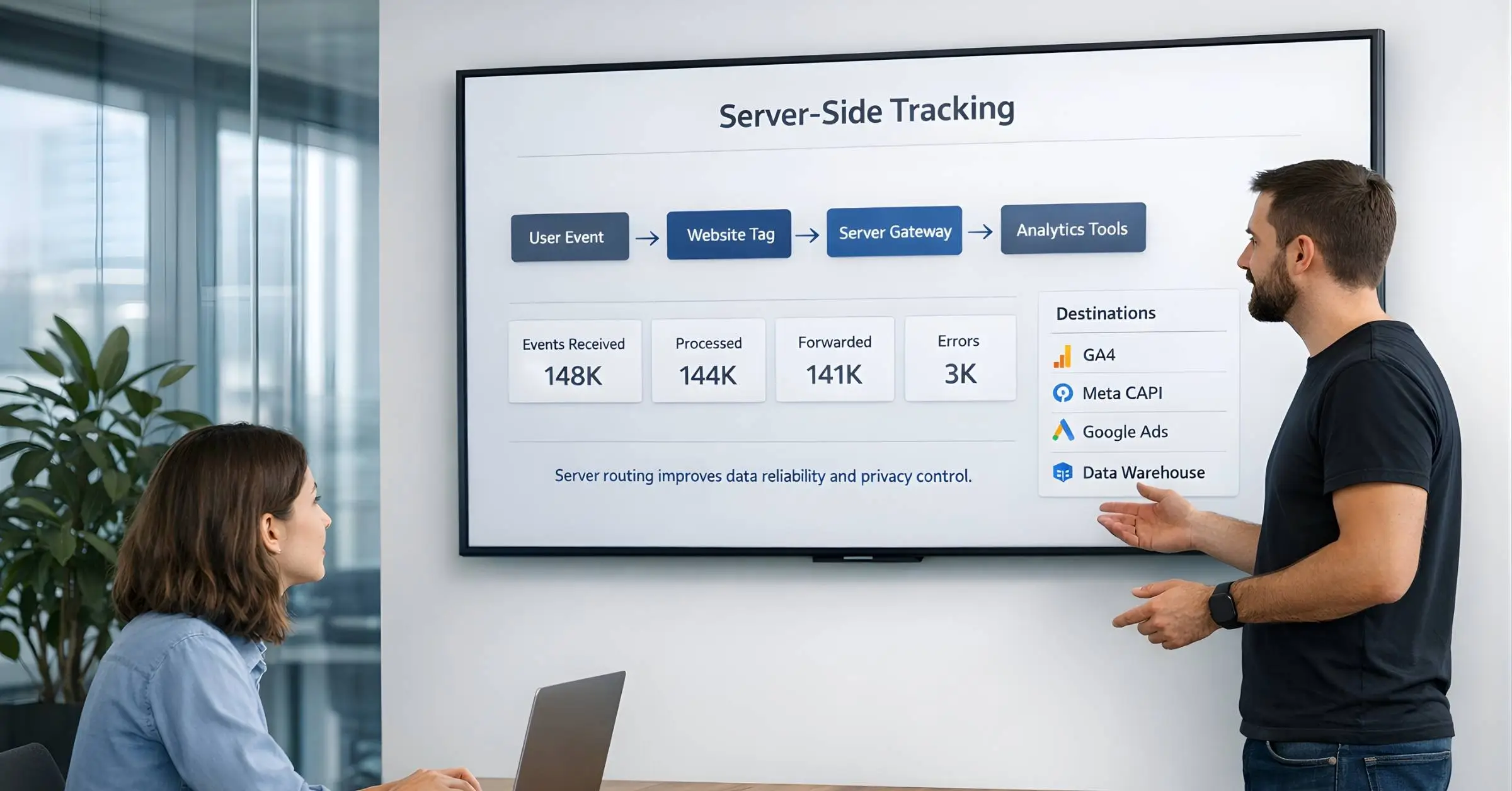
Server-side tracking isn't complicated once you understand the path your data takes. Instead of sending tracking data directly from the browser to ad platforms (where it can be blocked), data flows through your own server first.
This guide walks through each step of that journey — what happens, where it happens, and why each step matters for your marketing data.
The 4-Step Journey
Every server-side tracking implementation follows the same fundamental flow:
THE SERVER-SIDE TRACKING DATA JOURNEY═══════════════════════════════════════════════════════════════════════STEP 1STEP 2STEP 3STEP 4──────────────── ──────────────── ──────────────── ────────────────USER BROWSER YOUR ADACTION SENDS SERVER PLATFORMS┌──────────┐ ┌──────────┐ ┌──────────┐ ┌──────────┐│ │ │ │ │ │ │ META ││ CLICK │───────►│ EVENT │───────►│ PROCESS │───────►│ GA4 ││ BROWSE │ │ DATA │ │ ENRICH │ │ GOOGLE ││ BUY │ │ │ │ FORWARD │ │ TIKTOK ││ │ │ │ │ │ │ │└──────────┘ └──────────┘ └──────────┘ └──────────┘│ ││ │▼ ▼Goes to YOUR Sent viasubdomain secure APIs(<ahref="https://pantosource.com/blog/first-party-tracking-shopify-setup"data-framer-link="Link:{"url":"https://pantosource.com/blog/first-party-tracking-shopify-setup","type":"url"}">first-party</a>) (server-to-server)
THE SERVER-SIDE TRACKING DATA JOURNEY═══════════════════════════════════════════════════════════════════════STEP 1STEP 2STEP 3STEP 4──────────────── ──────────────── ──────────────── ────────────────USER BROWSER YOUR ADACTION SENDS SERVER PLATFORMS┌──────────┐ ┌──────────┐ ┌──────────┐ ┌──────────┐│ │ │ │ │ │ │ META ││ CLICK │───────►│ EVENT │───────►│ PROCESS │───────►│ GA4 ││ BROWSE │ │ DATA │ │ ENRICH │ │ GOOGLE ││ BUY │ │ │ │ FORWARD │ │ TIKTOK ││ │ │ │ │ │ │ │└──────────┘ └──────────┘ └──────────┘ └──────────┘│ ││ │▼ ▼Goes to YOUR Sent viasubdomain secure APIs(<ahref="https://pantosource.com/blog/first-party-tracking-shopify-setup"data-framer-link="Link:{"url":"https://pantosource.com/blog/first-party-tracking-shopify-setup","type":"url"}">first-party</a>) (server-to-server)
THE SERVER-SIDE TRACKING DATA JOURNEY═══════════════════════════════════════════════════════════════════════STEP 1STEP 2STEP 3STEP 4──────────────── ──────────────── ──────────────── ────────────────USER BROWSER YOUR ADACTION SENDS SERVER PLATFORMS┌──────────┐ ┌──────────┐ ┌──────────┐ ┌──────────┐│ │ │ │ │ │ │ META ││ CLICK │───────►│ EVENT │───────►│ PROCESS │───────►│ GA4 ││ BROWSE │ │ DATA │ │ ENRICH │ │ GOOGLE ││ BUY │ │ │ │ FORWARD │ │ TIKTOK ││ │ │ │ │ │ │ │└──────────┘ └──────────┘ └──────────┘ └──────────┘│ ││ │▼ ▼Goes to YOUR Sent viasubdomain secure APIs(<ahref="https://pantosource.com/blog/first-party-tracking-shopify-setup"data-framer-link="Link:{"url":"https://pantosource.com/blog/first-party-tracking-shopify-setup","type":"url"}">first-party</a>) (server-to-server)
Let's break down each step.
Step 1: User Takes an Action
Everything starts with user behavior. Someone visits your site, clicks a button, adds to cart, or completes a purchase. These actions trigger tracking events.
Common events captured:
PageView — User loads a page
ViewContent — User views a product
AddToCart — User adds item to cart
InitiateCheckout — User starts checkout
Purchase — User completes transaction
Lead — User submits a form
At this stage, nothing is different from traditional tracking. The browser still detects the action through JavaScript — typically via your data layer or tag manager.
💡 Key Point
Server-side tracking doesn't replace browser-based event detection. The browser is still the "eyes and ears" that see what users do. The server is the "brain" that processes and delivers that information reliably.
Step 2: Browser Sends Data to Your Server
Here's where server-side tracking diverges from traditional pixels.
Traditional (Client-Side): Browser sends data directly to connect.facebook.net or google-analytics.com — third-party domains that ad blockers recognize and block.
Server-Side: Browser sends data to your own subdomain (e.g., track.yoursite.com) — a first-party request that browsers and ad blockers don't restrict.
For the deeper comparison of client-side vs server-side tracking — including when to use each and the architectural tradeoffs — see that guide.
CLIENT-SIDE vs. SERVER-SIDE:WHERE DATA GOES═══════════════════════════════════════════════════════════════════════CLIENT-SIDE:┌──────────┐ ┌──────────────────────────┐│ BROWSER │────────►│ connect.facebook.net│ ❌ BLOCKED│ │ │(Third-party domain)│└──────────┘ └──────────────────────────┘│┌────────┴────────┐│ AD BLOCKERS ││ ITP / ETP ││ PRIVACY TOOLS │└─────────────────┘SERVER-SIDE:┌──────────┐ ┌──────────────────────────┐│ BROWSER │────────►│ track.yoursite.com│ ✅ ALLOWED│ │ │(Your subdomain)│└──────────┘ └──────────────────────────┘│┌────────┴────────┐│ FIRST-PARTY ││ NOT BLOCKED ││ TREATED AS ││ SITE FUNCTION │└─────────────────┘
CLIENT-SIDE vs. SERVER-SIDE:WHERE DATA GOES═══════════════════════════════════════════════════════════════════════CLIENT-SIDE:┌──────────┐ ┌──────────────────────────┐│ BROWSER │────────►│ connect.facebook.net│ ❌ BLOCKED│ │ │(Third-party domain)│└──────────┘ └──────────────────────────┘│┌────────┴────────┐│ AD BLOCKERS ││ ITP / ETP ││ PRIVACY TOOLS │└─────────────────┘SERVER-SIDE:┌──────────┐ ┌──────────────────────────┐│ BROWSER │────────►│ track.yoursite.com│ ✅ ALLOWED│ │ │(Your subdomain)│└──────────┘ └──────────────────────────┘│┌────────┴────────┐│ FIRST-PARTY ││ NOT BLOCKED ││ TREATED AS ││ SITE FUNCTION │└─────────────────┘
CLIENT-SIDE vs. SERVER-SIDE:WHERE DATA GOES═══════════════════════════════════════════════════════════════════════CLIENT-SIDE:┌──────────┐ ┌──────────────────────────┐│ BROWSER │────────►│ connect.facebook.net│ ❌ BLOCKED│ │ │(Third-party domain)│└──────────┘ └──────────────────────────┘│┌────────┴────────┐│ AD BLOCKERS ││ ITP / ETP ││ PRIVACY TOOLS │└─────────────────┘SERVER-SIDE:┌──────────┐ ┌──────────────────────────┐│ BROWSER │────────►│ track.yoursite.com│ ✅ ALLOWED│ │ │(Your subdomain)│└──────────┘ └──────────────────────────┘│┌────────┴────────┐│ FIRST-PARTY ││ NOT BLOCKED ││ TREATED AS ││ SITE FUNCTION │└─────────────────┘
Why First-Party Matters
When data goes to your own domain:
Ad blockers can't distinguish it from normal site requests
Safari ITP doesn't restrict it — cookies can last 400+ days instead of 7
Browser privacy features don't block it — it looks like essential site functionality
The Subdomain "Handshake" Explained
Many marketers wonder: Why does using a subdomain bypass tracking restrictions?
The answer is how browsers determine "first-party" vs. "third-party":
THE FIRST-PARTY HANDSHAKE═══════════════════════════════════════════════════════════════════════WHEN USER VISITS:www.yoursite.comBROWSER ASKS:"Is this request going to the SAME domain I'm on?"THIRD-PARTY REQUEST(BLOCKED):┌──────────────────┐ ┌──────────────────┐│ www.yoursite│ │ connect. ││ .com│────────►│ facebook.net││ │ │ ││ "I'm on │ │ "Different ││ yoursite" │ │ domain!"│└──────────────────┘ └──────────────────┘│ │└────────────────────────────┘│▼❌ BLOCKED BY:• Ad blockers(known trackingdomain)• Safari ITP(third-party cookierestrictions)• Firefox ETP(enhanced trackingprotection)FIRST-PARTY REQUEST(ALLOWED):┌──────────────────┐ ┌──────────────────┐│ www.yoursite│ │ track.yoursite││ .com│────────►│ .com││ │ │ ││ "I'm on │ │ "Same domain ││ yoursite" │ │ family!"│└──────────────────┘ └──────────────────┘│ │└────────────────────────────┘│▼✅ ALLOWED BECAUSE:• Same root domain(yoursite.com)• Browser treatsas essential site function•Cookies setas first-party(400+ day lifespan)• Indistinguishable from normal site requests
THE FIRST-PARTY HANDSHAKE═══════════════════════════════════════════════════════════════════════WHEN USER VISITS:www.yoursite.comBROWSER ASKS:"Is this request going to the SAME domain I'm on?"THIRD-PARTY REQUEST(BLOCKED):┌──────────────────┐ ┌──────────────────┐│ www.yoursite│ │ connect. ││ .com│────────►│ facebook.net││ │ │ ││ "I'm on │ │ "Different ││ yoursite" │ │ domain!"│└──────────────────┘ └──────────────────┘│ │└────────────────────────────┘│▼❌ BLOCKED BY:• Ad blockers(known trackingdomain)• Safari ITP(third-party cookierestrictions)• Firefox ETP(enhanced trackingprotection)FIRST-PARTY REQUEST(ALLOWED):┌──────────────────┐ ┌──────────────────┐│ www.yoursite│ │ track.yoursite││ .com│────────►│ .com││ │ │ ││ "I'm on │ │ "Same domain ││ yoursite" │ │ family!"│└──────────────────┘ └──────────────────┘│ │└────────────────────────────┘│▼✅ ALLOWED BECAUSE:• Same root domain(yoursite.com)• Browser treatsas essential site function•Cookies setas first-party(400+ day lifespan)• Indistinguishable from normal site requests
THE FIRST-PARTY HANDSHAKE═══════════════════════════════════════════════════════════════════════WHEN USER VISITS:www.yoursite.comBROWSER ASKS:"Is this request going to the SAME domain I'm on?"THIRD-PARTY REQUEST(BLOCKED):┌──────────────────┐ ┌──────────────────┐│ www.yoursite│ │ connect. ││ .com│────────►│ facebook.net││ │ │ ││ "I'm on │ │ "Different ││ yoursite" │ │ domain!"│└──────────────────┘ └──────────────────┘│ │└────────────────────────────┘│▼❌ BLOCKED BY:• Ad blockers(known trackingdomain)• Safari ITP(third-party cookierestrictions)• Firefox ETP(enhanced trackingprotection)FIRST-PARTY REQUEST(ALLOWED):┌──────────────────┐ ┌──────────────────┐│ www.yoursite│ │ track.yoursite││ .com│────────►│ .com││ │ │ ││ "I'm on │ │ "Same domain ││ yoursite" │ │ family!"│└──────────────────┘ └──────────────────┘│ │└────────────────────────────┘│▼✅ ALLOWED BECAUSE:• Same root domain(yoursite.com)• Browser treatsas essential site function•Cookies setas first-party(400+ day lifespan)• Indistinguishable from normal site requests
The data sent to your server includes:
Event type (purchase, add_to_cart, etc.)
Event value (purchase amount)
User identifiers (hashed email, phone, client ID)
Context (page URL, timestamp, UTM parameters)
Click IDs (fbclid, gclid, ttclid for attribution)
Step 3: Your Server Processes the Data
This is where server-side tracking adds real value. Your server doesn't just pass data through — it transforms it.
What Happens at the Server
Process
What It Does
Why It Matters
Validation
Checks if required fields are present
Prevents incomplete events from polluting data
Enrichment
Adds CRM data, customer segments, LTV
Gives platforms richer signals for optimization
Deduplication
Matches browser + server events by event_id
Prevents double-counting conversions
Consent Handling
Manages Consent Mode v2 signals
Ensures GDPR/CCPA compliance + enables modeling
PII Hashing
Converts email/phone to SHA256 hashes
Protects privacy while enabling matching
Bot Filtering
Removes known bot/spam traffic
Keeps conversion data clean
The match-rate impact of enrichment is measured directly by Meta's EMQ score. For the full breakdown of identifier weighting, benchmarks by event type, and how to push EMQ above 8.0, see the Event Match Quality guide.
Consent Mode v2: Advanced Consent Handling
In 2026, your server doesn't just check "consent = yes/no." With Google Consent Mode v2 (Advanced), the server handles nuanced consent states:
CONSENT MODE v2:HOW THE SERVER HANDLES CONSENT═══════════════════════════════════════════════════════════════════════USER GRANTS CONSENT:┌─────────────────────────────────────────────────────────────────────┐│ ✓ Full event data sent to platforms ││ ✓ Cookies set normally(400+ days onfirst-party)││ ✓ All identifiers included formatching │└─────────────────────────────────────────────────────────────────────┘USER DENIES CONSENT(Advanced Mode):┌─────────────────────────────────────────────────────────────────────┐│ → Server sends "cookieless pings"to Google ││ → Pings include:timestamp,user agent,page URL,consent state ││ → NO cookies set,NO personal identifiers sent ││ → Google uses pings forconversion MODELING(fills datagaps)││ ││ WHY THIS MATTERS:││ Without Advanced Mode:0% data from non-consenting users ││ With Advanced Mode: ~70% of conversions recovered via modeling │└─────────────────────────────────────────────────────────────────────┘
CONSENT MODE v2:HOW THE SERVER HANDLES CONSENT═══════════════════════════════════════════════════════════════════════USER GRANTS CONSENT:┌─────────────────────────────────────────────────────────────────────┐│ ✓ Full event data sent to platforms ││ ✓ Cookies set normally(400+ days onfirst-party)││ ✓ All identifiers included formatching │└─────────────────────────────────────────────────────────────────────┘USER DENIES CONSENT(Advanced Mode):┌─────────────────────────────────────────────────────────────────────┐│ → Server sends "cookieless pings"to Google ││ → Pings include:timestamp,user agent,page URL,consent state ││ → NO cookies set,NO personal identifiers sent ││ → Google uses pings forconversion MODELING(fills datagaps)││ ││ WHY THIS MATTERS:││ Without Advanced Mode:0% data from non-consenting users ││ With Advanced Mode: ~70% of conversions recovered via modeling │└─────────────────────────────────────────────────────────────────────┘
CONSENT MODE v2:HOW THE SERVER HANDLES CONSENT═══════════════════════════════════════════════════════════════════════USER GRANTS CONSENT:┌─────────────────────────────────────────────────────────────────────┐│ ✓ Full event data sent to platforms ││ ✓ Cookies set normally(400+ days onfirst-party)││ ✓ All identifiers included formatching │└─────────────────────────────────────────────────────────────────────┘USER DENIES CONSENT(Advanced Mode):┌─────────────────────────────────────────────────────────────────────┐│ → Server sends "cookieless pings"to Google ││ → Pings include:timestamp,user agent,page URL,consent state ││ → NO cookies set,NO personal identifiers sent ││ → Google uses pings forconversion MODELING(fills datagaps)││ ││ WHY THIS MATTERS:││ Without Advanced Mode:0% data from non-consenting users ││ With Advanced Mode: ~70% of conversions recovered via modeling │└─────────────────────────────────────────────────────────────────────┘
💡 2026 Technical Note
Consent Mode v2 includes additional parameters (ad_user_data, ad_personalization) beyond the original ad_storage and analytics_storage. Your server reads these signals and adjusts what data gets forwarded — full events for consenting users, anonymous pings for non-consenting users.
The Power of Enrichment: What Platforms See
Enrichment is where server-side tracking creates real competitive advantage. Here's what Meta sees with and without server-side enrichment:
ENRICHMENT:WHAT META SEES═══════════════════════════════════════════════════════════════════════WITHOUT SERVER-SIDE ENRICHMENT(Pixel Only):┌─────────────────────────────────────────────────────────────────────┐│ {││ "event":"Purchase",││ "value":149.99,││ "currency":"USD",││ "fbclid":"abc123..."││}││ ││ Meta knows:Someone bought something for$149.99││ Meta doesn't know: Who they are, what they bought, their value │
└─────────────────────────────────────────────────────────────────────┘vs.
WITHSERVER-SIDE ENRICHMENT:┌─────────────────────────────────────────────────────────────────────┐│ {││ "event":"Purchase",││ "value":149.99,││ "currency":"USD",││ "em":"a1b2c3d4..."(hashed email),││ "ph":"f6e5d4c3..."(hashed phone),││ "external_id":"cust_12345",││ "fbclid":"abc123...",││ "customer_segment":"high_value_repeat",││ "ltv_score":"top_10_percent",││ "product_category":"running_shoes",││ "first_purchase":false,││ "days_since_last_order":45││}││ ││ Meta knows:This is a high-value repeat customerintop 10% LTV,││ buying running shoes,45days since last order ││ Meta can:Find MORE customers like thisone │└─────────────────────────────────────────────────────────────────────┘THE OPTIMIZATION IMPACT:├── Without enrichment:Meta optimizes for"people who buy stuff"├── With enrichment:Meta optimizes for"high-LTV repeat customers"└── Result:Lower CAC,higher ROAS,better audience quality
ENRICHMENT:WHAT META SEES═══════════════════════════════════════════════════════════════════════WITHOUT SERVER-SIDE ENRICHMENT(Pixel Only):┌─────────────────────────────────────────────────────────────────────┐│ {││ "event":"Purchase",││ "value":149.99,││ "currency":"USD",││ "fbclid":"abc123..."││}││ ││ Meta knows:Someone bought something for$149.99││ Meta doesn't know: Who they are, what they bought, their value │
└─────────────────────────────────────────────────────────────────────┘vs.
WITHSERVER-SIDE ENRICHMENT:┌─────────────────────────────────────────────────────────────────────┐│ {││ "event":"Purchase",││ "value":149.99,││ "currency":"USD",││ "em":"a1b2c3d4..."(hashed email),││ "ph":"f6e5d4c3..."(hashed phone),││ "external_id":"cust_12345",││ "fbclid":"abc123...",││ "customer_segment":"high_value_repeat",││ "ltv_score":"top_10_percent",││ "product_category":"running_shoes",││ "first_purchase":false,││ "days_since_last_order":45││}││ ││ Meta knows:This is a high-value repeat customerintop 10% LTV,││ buying running shoes,45days since last order ││ Meta can:Find MORE customers like thisone │└─────────────────────────────────────────────────────────────────────┘THE OPTIMIZATION IMPACT:├── Without enrichment:Meta optimizes for"people who buy stuff"├── With enrichment:Meta optimizes for"high-LTV repeat customers"└── Result:Lower CAC,higher ROAS,better audience quality
ENRICHMENT:WHAT META SEES═══════════════════════════════════════════════════════════════════════WITHOUT SERVER-SIDE ENRICHMENT(Pixel Only):┌─────────────────────────────────────────────────────────────────────┐│ {││ "event":"Purchase",││ "value":149.99,││ "currency":"USD",││ "fbclid":"abc123..."││}││ ││ Meta knows:Someone bought something for$149.99││ Meta doesn't know: Who they are, what they bought, their value │
└─────────────────────────────────────────────────────────────────────┘vs.
WITHSERVER-SIDE ENRICHMENT:┌─────────────────────────────────────────────────────────────────────┐│ {││ "event":"Purchase",││ "value":149.99,││ "currency":"USD",││ "em":"a1b2c3d4..."(hashed email),││ "ph":"f6e5d4c3..."(hashed phone),││ "external_id":"cust_12345",││ "fbclid":"abc123...",││ "customer_segment":"high_value_repeat",││ "ltv_score":"top_10_percent",││ "product_category":"running_shoes",││ "first_purchase":false,││ "days_since_last_order":45││}││ ││ Meta knows:This is a high-value repeat customerintop 10% LTV,││ buying running shoes,45days since last order ││ Meta can:Find MORE customers like thisone │└─────────────────────────────────────────────────────────────────────┘THE OPTIMIZATION IMPACT:├── Without enrichment:Meta optimizes for"people who buy stuff"├── With enrichment:Meta optimizes for"high-LTV repeat customers"└── Result:Lower CAC,higher ROAS,better audience quality
Example: A Purchase Event
RAW EVENT(from browser):═══════════════════════════════════════════════════════════════════════{"event":"purchase","value":149.99,"currency":"USD","email":"customer@email.com","phone":"+1234567890","items":[{"sku":"SHOE-001","qty":1}],"fbclid":"abc123...","gclid":"xyz789..."}│▼SERVER PROCESSING│▼PROCESSED EVENT(ready for platforms):═══════════════════════════════════════════════════════════════════════{"event":"Purchase","value":149.99,"currency":"USD","em":"a1b2c3d4e5f6..."(SHA256 hashedemail),"ph":"f6e5d4c3b2a1..."(SHA256 hashedphone),"event_id":"evt_20260224_001"(fordeduplication),"customer_segment":"high_value"(enriched fromCRM),"ltv_tier":"top_10_percent"(enriched frombackend),"consent_status":"granted","fbclid":"abc123...","gclid":"xyz789..."}
RAW EVENT(from browser):═══════════════════════════════════════════════════════════════════════{"event":"purchase","value":149.99,"currency":"USD","email":"customer@email.com","phone":"+1234567890","items":[{"sku":"SHOE-001","qty":1}],"fbclid":"abc123...","gclid":"xyz789..."}│▼SERVER PROCESSING│▼PROCESSED EVENT(ready for platforms):═══════════════════════════════════════════════════════════════════════{"event":"Purchase","value":149.99,"currency":"USD","em":"a1b2c3d4e5f6..."(SHA256 hashedemail),"ph":"f6e5d4c3b2a1..."(SHA256 hashedphone),"event_id":"evt_20260224_001"(fordeduplication),"customer_segment":"high_value"(enriched fromCRM),"ltv_tier":"top_10_percent"(enriched frombackend),"consent_status":"granted","fbclid":"abc123...","gclid":"xyz789..."}
RAW EVENT(from browser):═══════════════════════════════════════════════════════════════════════{"event":"purchase","value":149.99,"currency":"USD","email":"customer@email.com","phone":"+1234567890","items":[{"sku":"SHOE-001","qty":1}],"fbclid":"abc123...","gclid":"xyz789..."}│▼SERVER PROCESSING│▼PROCESSED EVENT(ready for platforms):═══════════════════════════════════════════════════════════════════════{"event":"Purchase","value":149.99,"currency":"USD","em":"a1b2c3d4e5f6..."(SHA256 hashedemail),"ph":"f6e5d4c3b2a1..."(SHA256 hashedphone),"event_id":"evt_20260224_001"(fordeduplication),"customer_segment":"high_value"(enriched fromCRM),"ltv_tier":"top_10_percent"(enriched frombackend),"consent_status":"granted","fbclid":"abc123...","gclid":"xyz789..."}
The processed event contains everything ad platforms need for:
Matching — Hashed identifiers connect the conversion to the user
Attribution — Click IDs link the conversion to specific ads
Optimization — Enriched data helps algorithms learn what works
Step 4: Server Forwards to Platforms via APIs
Your server sends the processed event to each ad platform using their server-side APIs:
Platform
API Name
What It Receives
Meta
Conversions API (CAPI)
Purchase events with hashed PII, fbclid
Google Analytics
Measurement Protocol
All events with client_id, session data
Google Ads
Enhanced Conversions
Conversions with hashed user data, gclid
TikTok
Events API
Events with ttclid, hashed identifiers
LinkedIn
Conversions API
B2B lead events with hashed email
Meta's CAPI is the most-implemented endpoint in this stack. For the full execution walkthrough on Meta Conversions API integration — including authentication, payload structure, and deduplication keys — see that guide.
Server-to-Server = No Browser Involved
This final transmission happens entirely between servers:
SERVER-TO-PLATFORM DELIVERY═══════════════════════════════════════════════════════════════════════YOUR SERVER AD PLATFORMS┌───────────────────┐ ┌───────────────────┐│ │ HTTPS │ ││ track.yoursite│───────────────►│ Meta CAPI ││ .com│ API │ graph.facebook││ │ Request │ .com││ │ │ ││ │───────────────►│ GA4 Measurement ││ │ │ Protocol ││ │ │ ││ │───────────────►│ Google Ads ││ │ │ Enhanced Conv. ││ │ │ ││ │───────────────►│ TikTok Events ││ │ │ API │└───────────────────┘ └───────────────────┘✓ No browser involved✓ No ad blockers to bypass✓ No cookie restrictions✓ Secure API authentication✓ Same event goes to all platforms consistently
SERVER-TO-PLATFORM DELIVERY═══════════════════════════════════════════════════════════════════════YOUR SERVER AD PLATFORMS┌───────────────────┐ ┌───────────────────┐│ │ HTTPS │ ││ track.yoursite│───────────────►│ Meta CAPI ││ .com│ API │ graph.facebook││ │ Request │ .com││ │ │ ││ │───────────────►│ GA4 Measurement ││ │ │ Protocol ││ │ │ ││ │───────────────►│ Google Ads ││ │ │ Enhanced Conv. ││ │ │ ││ │───────────────►│ TikTok Events ││ │ │ API │└───────────────────┘ └───────────────────┘✓ No browser involved✓ No ad blockers to bypass✓ No cookie restrictions✓ Secure API authentication✓ Same event goes to all platforms consistently
SERVER-TO-PLATFORM DELIVERY═══════════════════════════════════════════════════════════════════════YOUR SERVER AD PLATFORMS┌───────────────────┐ ┌───────────────────┐│ │ HTTPS │ ││ track.yoursite│───────────────►│ Meta CAPI ││ .com│ API │ graph.facebook││ │ Request │ .com││ │ │ ││ │───────────────►│ GA4 Measurement ││ │ │ Protocol ││ │ │ ││ │───────────────►│ Google Ads ││ │ │ Enhanced Conv. ││ │ │ ││ │───────────────►│ TikTok Events ││ │ │ API │└───────────────────┘ └───────────────────┘✓ No browser involved✓ No ad blockers to bypass✓ No cookie restrictions✓ Secure API authentication✓ Same event goes to all platforms consistently
Authentication: Each platform requires API credentials (access tokens, API secrets). Your server authenticates with these credentials to prove the data is legitimate.
Deduplication: If you're running both pixel AND server-side (recommended), platforms use the shared event_id to merge duplicate events automatically.
Why Each Step Matters
Step
What Breaks Without It
1. User Action
No event = nothing to track
2. First-Party Routing
Third-party requests get blocked (20-40% data loss)
3. Server Processing
Raw data lacks enrichment, contains duplicates, may violate consent
4. API Delivery
Data never reaches platforms for attribution and optimization
Real-World Example: A Purchase Journey
Let's trace an actual purchase through all 4 steps:
The Scenario: Sarah clicks a Meta ad for running shoes, browses your site, and buys a pair for $149.
Step 1: Sarah Completes Purchase
Sarah clicks "Place Order" on your checkout page. Your website's data layer fires a purchase event with order details.
Step 2: Browser Sends to Your Server
Instead of sending to connect.facebook.net (which her ad blocker would block), the event goes to track.yourshoestore.com — your subdomain. Her browser sees this as a normal request to your site.
Step 3: Your Server Processes
Your server container:
Validates the purchase data is complete
Hashes Sarah's email (SHA256) for privacy
Adds her customer segment ("repeat_buyer") from your CRM
Attaches the fbclid from her original ad click
Generates an event_id for deduplication
Confirms she consented to marketing tracking
Step 4: Server Delivers to Platforms
Your server sends the processed purchase event to:
Meta CAPI — So Meta can attribute the sale to the ad Sarah clicked
GA4 — So you can see the conversion in your analytics
Google Ads — If she also clicked a Google ad earlier (attribution)
The Result: Meta sees the $149 purchase, attributes it to Sarah's ad click, and uses this signal to find more customers like her. Without server-side tracking, this entire conversion would have been invisible due to Sarah's ad blocker.
The Technical Components
To make this journey work, you need:
Server Container (sGTM)
The most common approach is Server-Side Google Tag Manager (sGTM). It's a container hosted on Google Cloud or AWS that receives events and routes them to platforms.
Custom Subdomain
A subdomain like track.yoursite.com or data.yoursite.com that points to your server container. This makes all requests first-party.
Platform Tags
Pre-built templates in sGTM that format your events correctly for each platform's API requirements (Meta CAPI, GA4, TikTok, etc.).
API Credentials
Access tokens and secrets from each ad platform that authenticate your server's requests.
What Server-Side Tracking Doesn't Do
Common misconceptions:
Misconception
Reality
"Replaces browser tracking"
Browser still detects events — server routes them differently
"Eliminates need for consent"
You still need user consent before collecting/sending data
"Works without any setup"
Requires server infrastructure, subdomain, API configuration
"Fixes all tracking issues"
Helps significantly but some data gaps remain (cross-device, offline)
The Bottom Line
Server-side tracking follows a simple 4-step journey:
User acts — Browser detects the event
Browser sends to your server — First-party request, not blocked
Server processes — Validates, enriches, deduplicates, checks consent
Server delivers to platforms — Secure API calls, no browser involved
The result: 95%+ of your conversion data reaches ad platforms, compared to 60-80% with browser-only tracking.
Key takeaways:
First-party routing is the key — Your subdomain bypasses blockers
The server adds value — Processing, enrichment, and compliance happen here
API delivery is reliable — Server-to-server transmission doesn't get blocked
Both browser + server is ideal — Hybrid setup with deduplication maximizes accuracy
Understanding this journey helps you diagnose issues, explain tracking to stakeholders, and make informed decisions about your measurement infrastructure.
Get Started
Start Tracking Every Sale Today
Join 10+ e-commerce stores. Set up in 5 minutes, see results in days.