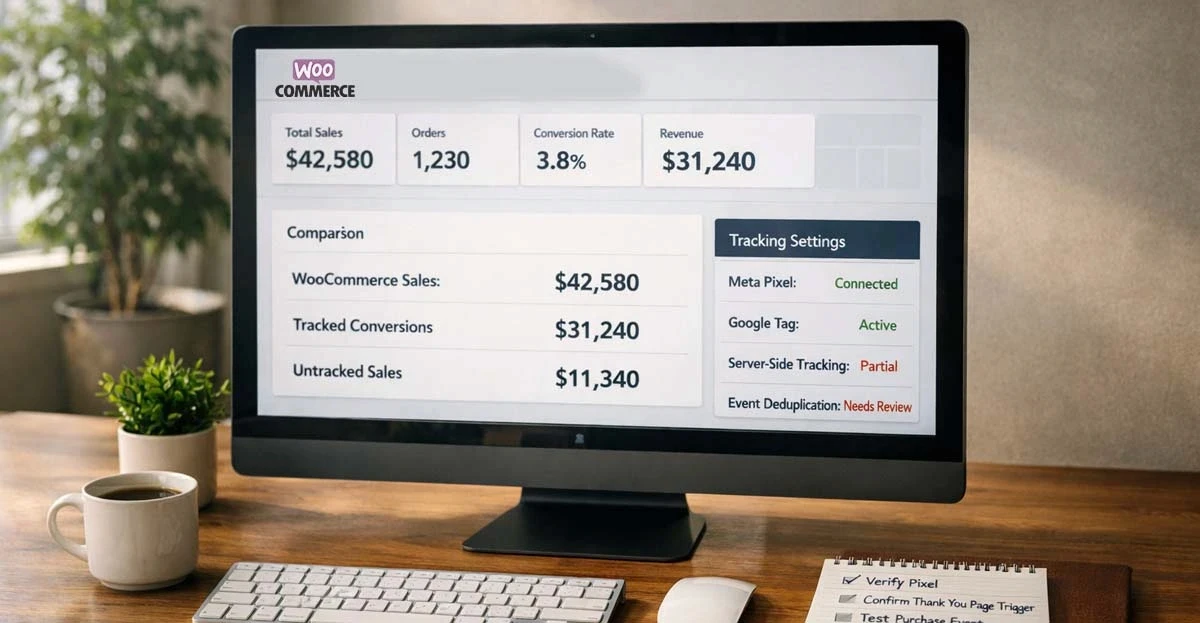
Your WooCommerce store processed 200 orders last week. Meta Ads Manager shows 120 purchases. Google Ads reports 95. Where did the other sales go?
They didn't go anywhere. They happened. Your customers paid. You shipped products.
But your ad platforms never saw those conversions. As far as Meta and Google know, those sales don't exist — which means their algorithms can't learn from them, can't find more customers like them, and can't optimize your campaigns based on what actually works.
This is the WooCommerce conversion tracking problem in 2026. And it's costing store owners thousands in wasted ad spend every month.
What Conversion Tracking Actually Does
Before diving into fixes, let's clarify what conversion tracking is supposed to do.
When someone clicks your ad and buys something, conversion tracking tells the ad platform: "This worked. Find more people like this."
That signal is how ad algorithms learn. The more accurate signals you send, the better the algorithm gets at finding buyers. The fewer signals you send, the more your ad spend goes to waste.
Simple math:
Send 100% of your sales to Meta → Algorithm learns from all buyers
Send 60% of your sales to Meta → Algorithm learns from partial data, misses patterns
This is why tracking accuracy directly impacts your advertising results.
Why WooCommerce Tracking Breaks in 2026
Traditional tracking relies on a piece of code (a "pixel") that runs in your customer's browser when they complete a purchase.
That worked well in 2018. It doesn't work well in 2026.
What blocks the pixel today:
Blocker | Impact |
|---|---|
iOS privacy settings | Blocks tracking for most iPhone users |
Ad blockers | Installed on 30-40% of desktop browsers |
Cookie restrictions | Safari and Firefox limit tracking cookies |
Slow page loads | Customer leaves before pixel fires |
Checkout redirects | PayPal, buy-now-pay-later break the tracking chain |
The WooCommerce-Specific Problem: Server Load
Unlike hosted platforms, WooCommerce runs on your own server. If your hosting is under-resourced (shared hosting, cheap VPS), the "Thank You" page may time out before tracking scripts execute.
This is a silent killer. Orders complete successfully, but the slow server never fires the pixel. You see the sale in WooCommerce — the ad platforms see nothing.
The Referral Attribution Nightmare
When customers pay through PayPal, Klarna, or other external gateways, they leave your site and return. This often restarts their session, causing the payment gateway to "steal" attribution credit from your ads.
Your Meta ad drove the sale, but GA4 shows "Referral: paypal.com" as the source.
Fix this in GA4: Add your payment gateways to the Referral Exclusion List (Admin → Data Streams → Configure Tag Settings → List Unwanted Referrals). Exclude domains like paypal.com, stripe.com, klarna.com, and any BNPL providers you use.
The result: your pixel only "sees" 50-70% of actual purchases. The rest are invisible to your ad platforms.
The Real Cost of Missing Conversions
Missing conversions aren't just a reporting problem. They directly hurt your business in three ways:
1. Worse Ad Performance
Ad algorithms optimize based on the conversions they receive. If they only see 60% of your buyers, they're optimizing on incomplete information.
It's like teaching someone to cook but only showing them 6 out of 10 steps. They'll make something, but it won't be as good as it could be.
2. Wrong Budget Decisions
If Meta shows 3.0x ROAS but your actual ROAS is 4.5x, you might cut a profitable campaign. If Google shows strong results but is actually over-claiming credit, you might scale a losing channel.
Bad data leads to bad decisions.
3. Higher Customer Acquisition Costs
When algorithms can't identify your best customers, they spend your money less efficiently. You pay more to acquire each customer than you should.
The Two Ways to Track WooCommerce Conversions
There are fundamentally two approaches to sending conversion data to ad platforms:
Browser-Based (Pixel) Tracking
How it works: JavaScript code runs in the customer's browser and sends data to ad platforms when events happen.
Pros: Easy to install with plugins. Free. Works immediately.
Cons: Blocked by ad blockers, privacy settings, and browser restrictions. Misses 40-60% of conversions in 2026.
Bottom line: A starting point, not a complete solution.
Server-Side Tracking
How it works: Your server sends conversion data directly to ad platforms, bypassing the customer's browser entirely.
Pros: Not blocked by ad blockers or privacy settings. Much more accurate.
Cons: More complex to set up. Some solutions require technical knowledge.
Bottom line: The reliable foundation for 2026 tracking. For the client side vs server side tracking breakdown — covering the architectural tradeoffs between these two approaches in detail — see that guide.
Platform-by-Platform: What You Need
Each ad platform has its own tracking requirements. Here's what "good tracking" looks like for WooCommerce stores in 2026:
Meta (Facebook/Instagram)
Minimum: Meta Pixel installed
Better: Meta Conversions API (server-side) — see how server-side tracking works in practice for the foundational architecture this CAPI setup builds on.
Best: Server-side tracking with full customer data (email, phone, fbp/fbc parameters) achieving Event Match Quality above 6.0
Key metric:Key metric: Check Event Match Quality in Events Manager. Below 6.0 means Meta can't match many conversions to ad clicks. For a related guide on meta conversion API CAPI — covering Meta's CAPI implementation in depth — see that breakdown.
Google Ads
Minimum: Google Ads conversion tag installed Better: Enhanced Conversions enabled (sends hashed customer data) Best: Server-side tracking with offline conversion imports for full accuracy
Key metric: Compare Google Ads reported conversions to actual WooCommerce orders. Gap larger than 20% indicates tracking problems.
TikTok
Minimum: TikTok Pixel installed Better: TikTok Events API (server-side) Best: Server-side with click ID capture for accurate attribution
Key metric: Check Events Manager for event activity and match rates.
Warning Signs Your Tracking Is Broken
You don't need technical expertise to spot tracking problems. Watch for these red flags:
Revenue mismatch: WooCommerce shows significantly more revenue than ad platforms report. A 10-15% gap is normal. A 30%+ gap means broken tracking.
iOS underperformance: If campaigns targeting iOS users show dramatically worse results than Android, tracking is likely the issue — not your ads.
Inconsistent data: Conversion counts that swing wildly day-to-day, especially if WooCommerce orders are stable.
Scaling problems: ROAS collapses when you increase budget. This often indicates algorithms are optimizing on incomplete data.
Event gaps: In Events Manager, you see days with zero or very few events despite having orders.
Slow site + missing conversions: If your WooCommerce site is on cheap hosting and loads slowly, the Thank You page may time out before pixels fire. Check your server response times — if pages take 3+ seconds, tracking is likely failing silently.
PayPal showing as top referrer: If GA4 shows payment gateways as major traffic sources, your referral exclusions aren't configured correctly.
How to Check Your Current Tracking
Here's a simple audit you can run today:
Step 1: Compare Numbers
Pull last week's data:
Total WooCommerce orders
Meta-reported purchases
Google-reported conversions
Calculate the gap. If ad platforms report less than 70% of actual orders, you have a significant tracking problem.
Step 2: Check Event Match Quality (Meta)
In Meta Events Manager:
Select your Pixel
Click on the Purchase event
Look at Event Match Quality score
EMQ Score | Meaning |
|---|---|
Below 4.0 | Poor — Meta can't match most events |
4.0-6.0 | Moderate — room for improvement |
6.0-8.0 | Good — working reasonably well |
Above 8.0 | Excellent — strong signal quality |
Step 3: Test Events
Use Meta's Test Events tool and Google Tag Assistant to verify events fire correctly during a test purchase.
Your Options for Fixing WooCommerce Tracking
From simplest to most robust:
Option 1: Plugin-Based Tracking
Install tracking plugins for each ad platform. Configure them to fire events on purchase.
Pros: Free or cheap. Quick setup. Cons: Still browser-based, so still blocked 40-60% of the time. Requires managing multiple plugins.
Best for: Stores just starting with paid ads, testing before investing in better tracking.
Option 2: Native Conversion APIs
Use Meta's and Google's built-in server-side options through WooCommerce extensions.
Pros: More accurate than pixels alone. Supported by the platforms. Cons: Still often triggered by browser events. Technical setup required. Must configure each platform separately.
Best for: Stores with technical resources who want platform-native solutions.
Option 3: Dedicated Tracking Platform
Use a service that connects directly to WooCommerce and handles all ad platform integrations.
Pros: Most accurate (tracks from order database, not browser). Handles multiple platforms. No ongoing technical maintenance. Cons: Monthly cost.
Best for: Stores serious about advertising ROI who want tracking that "just works." For the turnkey platform integrations that connect WooCommerce directly to Meta, Google, and TikTok via their server-side APIs, see the integrations page.
What Good Tracking Looks Like
When your WooCommerce conversion tracking is working properly:
Ad platform revenue matches WooCommerce within 10-15%
Event Match Quality above 6.0 (ideally 8.0+)
Consistent daily event counts that correlate with actual orders
iOS and Android campaigns perform comparably
Scaling budget improves results instead of killing them
This isn't a fantasy. It's what accurate server-side tracking delivers.
Get Started
Start Tracking Every Sale Today
Join 10+ e-commerce stores. Set up in 5 minutes, see results in days.